業務データとつながる、
企業向けAIエージェント基盤
An enterprise AI agent platform connected to business data
2025.05 – 2026.06
言葉で指示すると、AI が業務データベースの検索・更新、ファイルの作成、スキル(Agent Skills)の実行、定例の作業の自動実行までを行う Web システムを、1人で1年以上かけて開発しました。
I spent over a year building, on my own, a web system where you give instructions in plain language and the AI searches and updates business databases, creates files, runs skills (Agent Skills) and automatically runs routine work.
- 開発期間In development
- 1年以上1+yr
- 処理モードProcessing modes
- 12種類
- 自動テストAutomated tests
- 776件
つくったものWhat I built
お客様の会社の製品として、企業向けの AI エージェントの基盤を開発しました。導入する会社ごとにライセンスを発行して使う作りです。
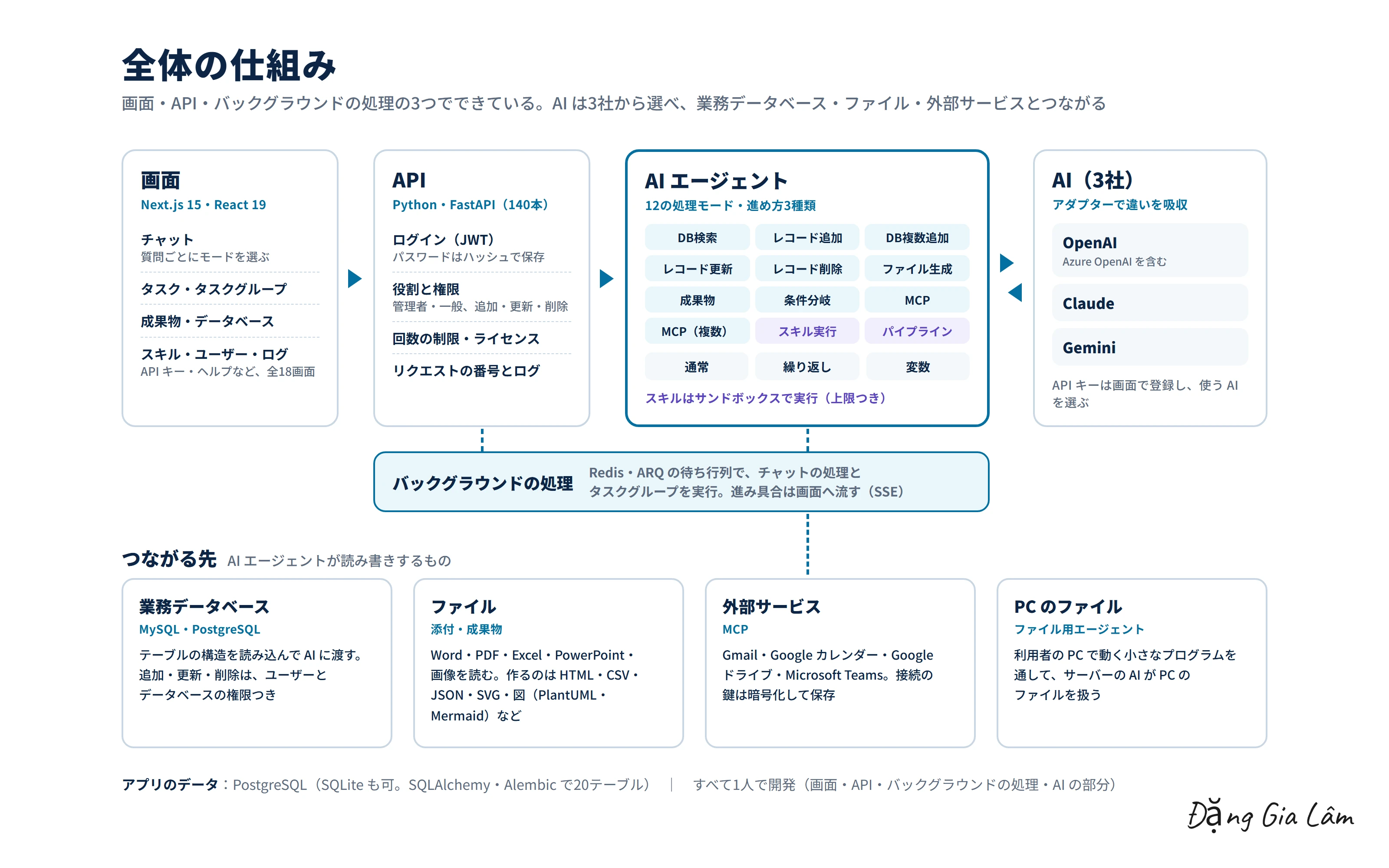
業務データベース・ファイル・メールやカレンダーなどの外部サービスに AI をつなぎ、言葉の指示で、検索・集計・更新・書類の作成・定例の作業を進められます。
I developed an enterprise AI agent platform as a product for a client company. Each company that adopts it is issued its own license.
It connects AI to business databases, files, and external services such as email and calendars, so people can search, aggregate, update, create documents and run routine work through plain-language instructions.
できることWhat it does
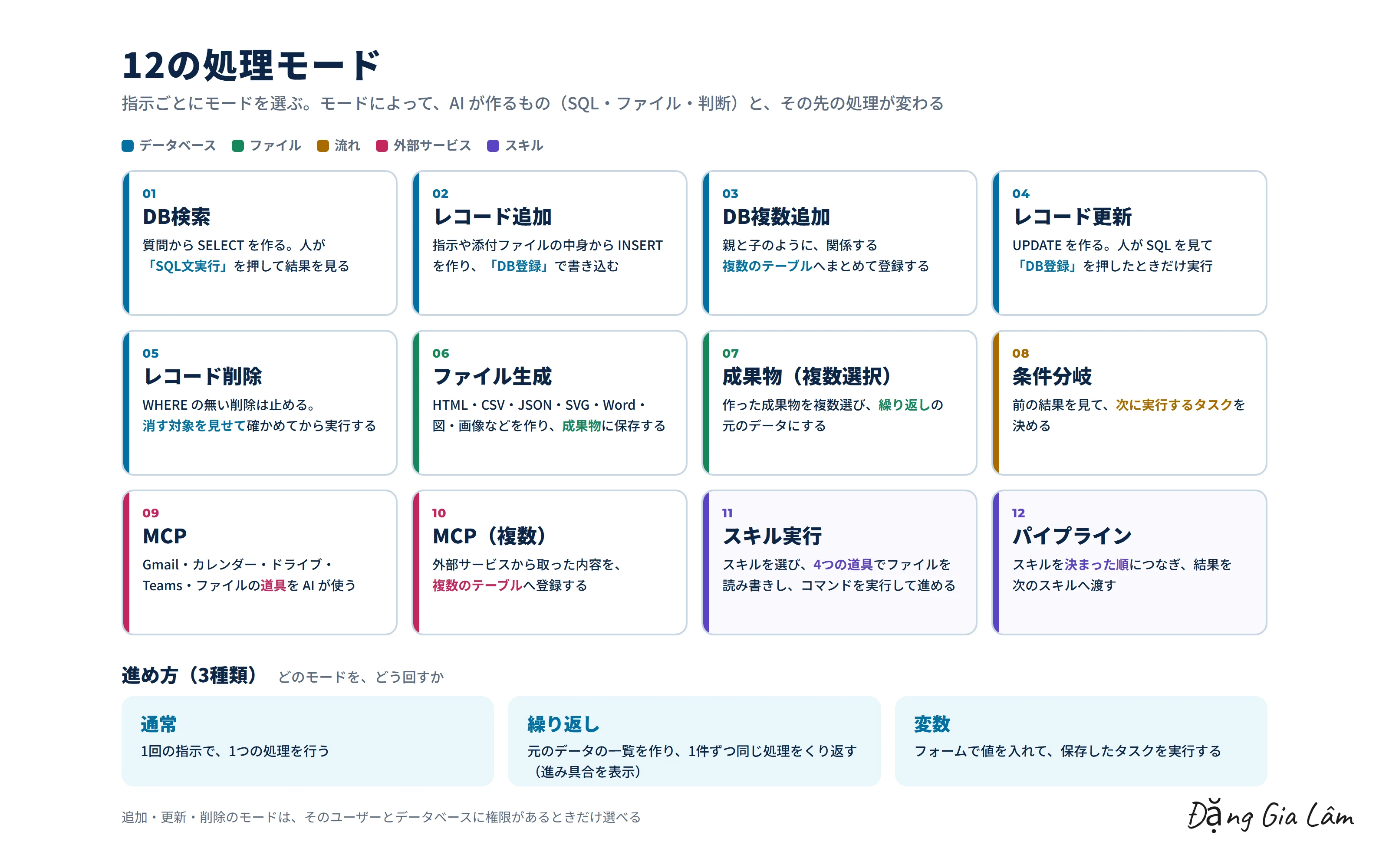
- 12の処理モード:DB検索、レコード追加・更新・削除、複数のテーブルへの登録、ファイル生成、条件分岐、MCP、スキル実行、パイプラインなど
- AI は OpenAI(Azure を含む)・Claude・Gemini の3社から選べる。会社ごとの違いは部品で吸収し、切り替えて使える
- 業務データベースは MySQL・PostgreSQL。テーブルの構造を読み込んで AI に渡し、AI が SQL を作る
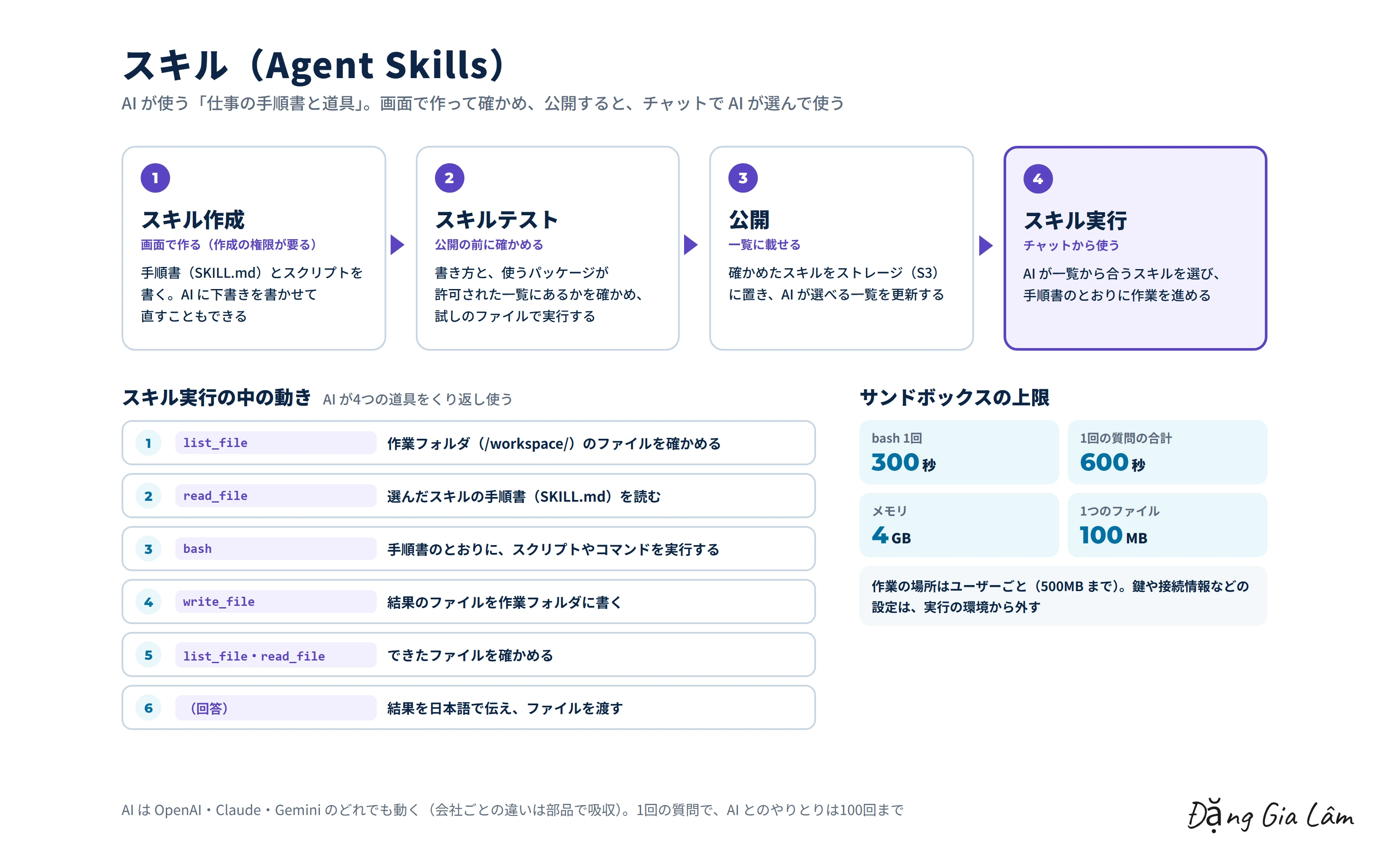
- スキル(Agent Skills):AI が手順書とスクリプトを使い、ファイルの読み書きとコマンドの実行をくり返して仕事を進める。スキルは画面で作り、テストして公開する
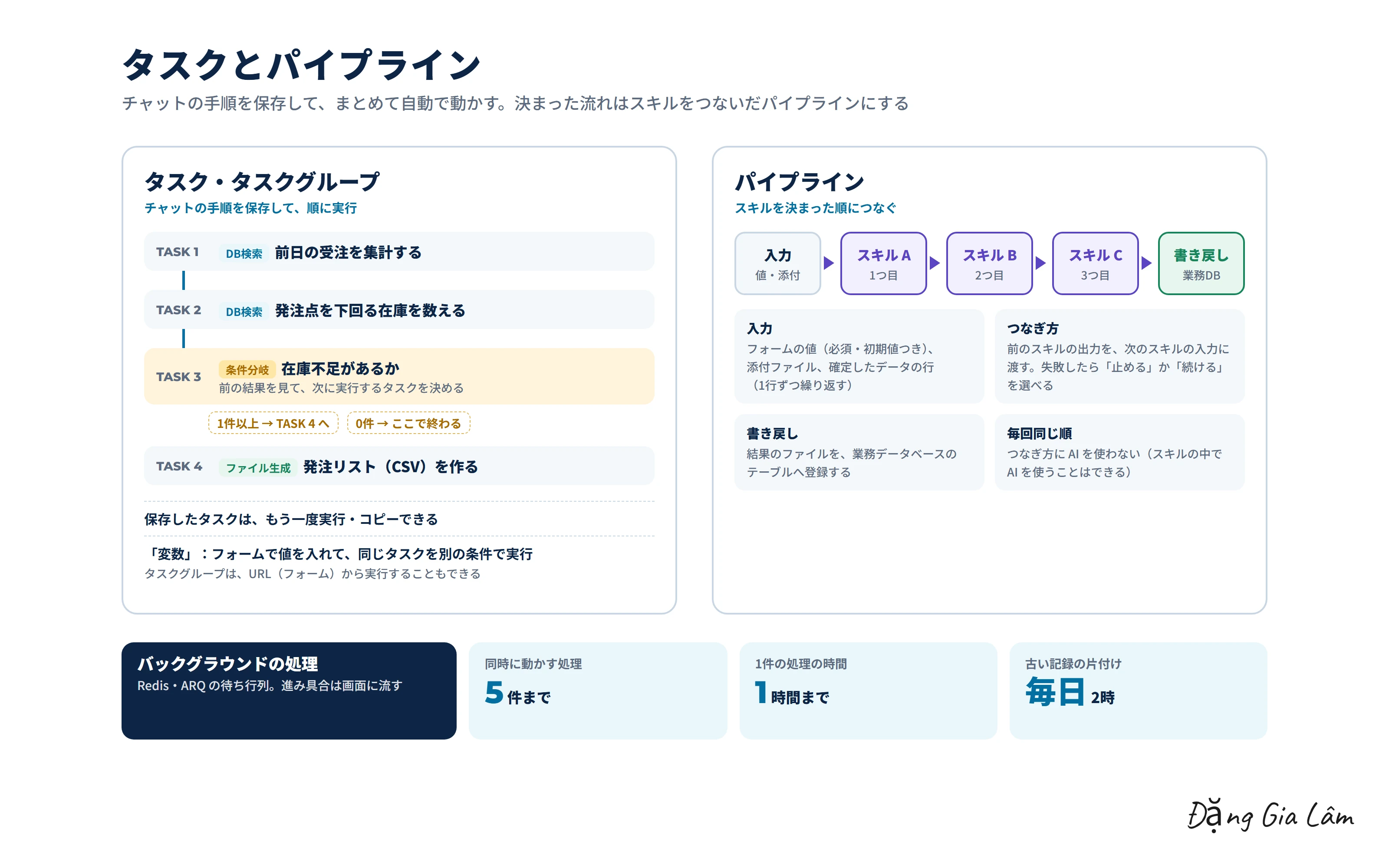
- タスクとタスクグループ:チャットの手順を保存し、まとめてバックグラウンドで実行。条件分岐で次のタスクを決め、進み具合は画面に流れる
- パイプライン:スキルを決まった順につなぎ、結果を業務データベースへ書き戻す
- Word・PDF・Excel・PowerPoint・画像を読み、HTML・CSV・JSON・SVG・図などを作る
- Gmail・Google カレンダー・Google ドライブ・Microsoft Teams、利用者の PC のファイルともつながる
- 12 processing modes: DB search, adding/updating/deleting records, registering across multiple tables, file generation, conditional branching, MCP, skill execution, pipelines and more
- The AI can be chosen from three providers: OpenAI (including Azure), Claude and Gemini. Differences between providers are absorbed by adapter components, so you can switch between them
- Business databases are MySQL and PostgreSQL. The system reads the table structure and passes it to the AI, which writes the SQL
- Skills (Agent Skills): the AI uses instructions and scripts, repeatedly reading and writing files and running commands to get the work done. Skills are created in the UI, tested, then published
- Tasks and task groups: save chat procedures and run them together in the background. Conditional branching decides the next task, and progress streams to the screen
- Pipelines: chain skills in a fixed order and write the results back to the business database
- Reads Word, PDF, Excel, PowerPoint and images, and produces HTML, CSV, JSON, SVG, diagrams and more
- Also connects to Gmail, Google Calendar, Google Drive, Microsoft Teams and files on the user's PC
工夫した点What I focused on
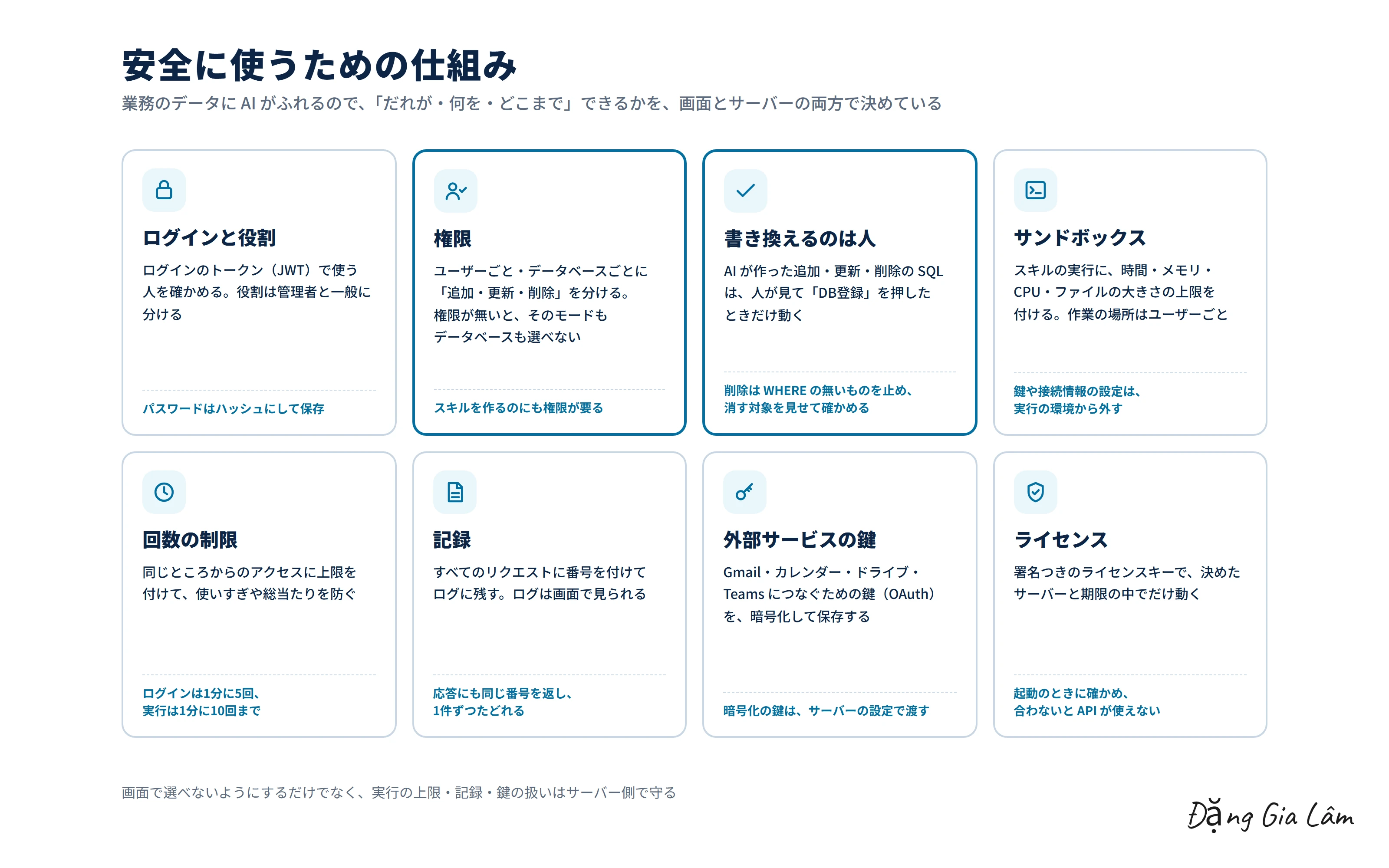
- AI が作った追加・更新・削除の SQL は、人が見て「DB登録」を押したときだけ動く。削除は WHERE の無いものを止め、消す対象を見せて確かめる
- 追加・更新・削除の権限を、ユーザーごと・データベースごとに分ける。権限が無いと、そのモードもデータベースも選べない
- スキルはサンドボックスで実行し、時間・メモリ・CPU・ファイルの大きさに上限を付ける。鍵や接続情報の設定は、実行の環境から外す
- ログイン(JWT)、役割、アクセスの回数の制限、リクエストの番号つきの記録、外部サービスの鍵の暗号化、署名つきのライセンス
- 時間のかかる処理は、Redis の待ち行列でバックグラウンドに回す
- 自動テストを776件書き、データベースの移行も記録で管理する
- Insert, update and delete SQL written by the AI only runs after a person reviews it and presses "Register to DB". Deletes without a WHERE clause are blocked, and the rows to be deleted are shown for confirmation
- Insert, update and delete permissions are set per user and per database. Without permission, neither the mode nor the database can be selected
- Skills run in a sandbox with limits on time, memory, CPU and file size. Keys and connection settings are kept out of the execution environment
- Login (JWT), roles, rate limiting, logs tagged with request IDs, encrypted keys for external services, and signed licenses
- Long-running work is moved to the background through a Redis queue
- 776 automated tests, with database migrations tracked as versioned records
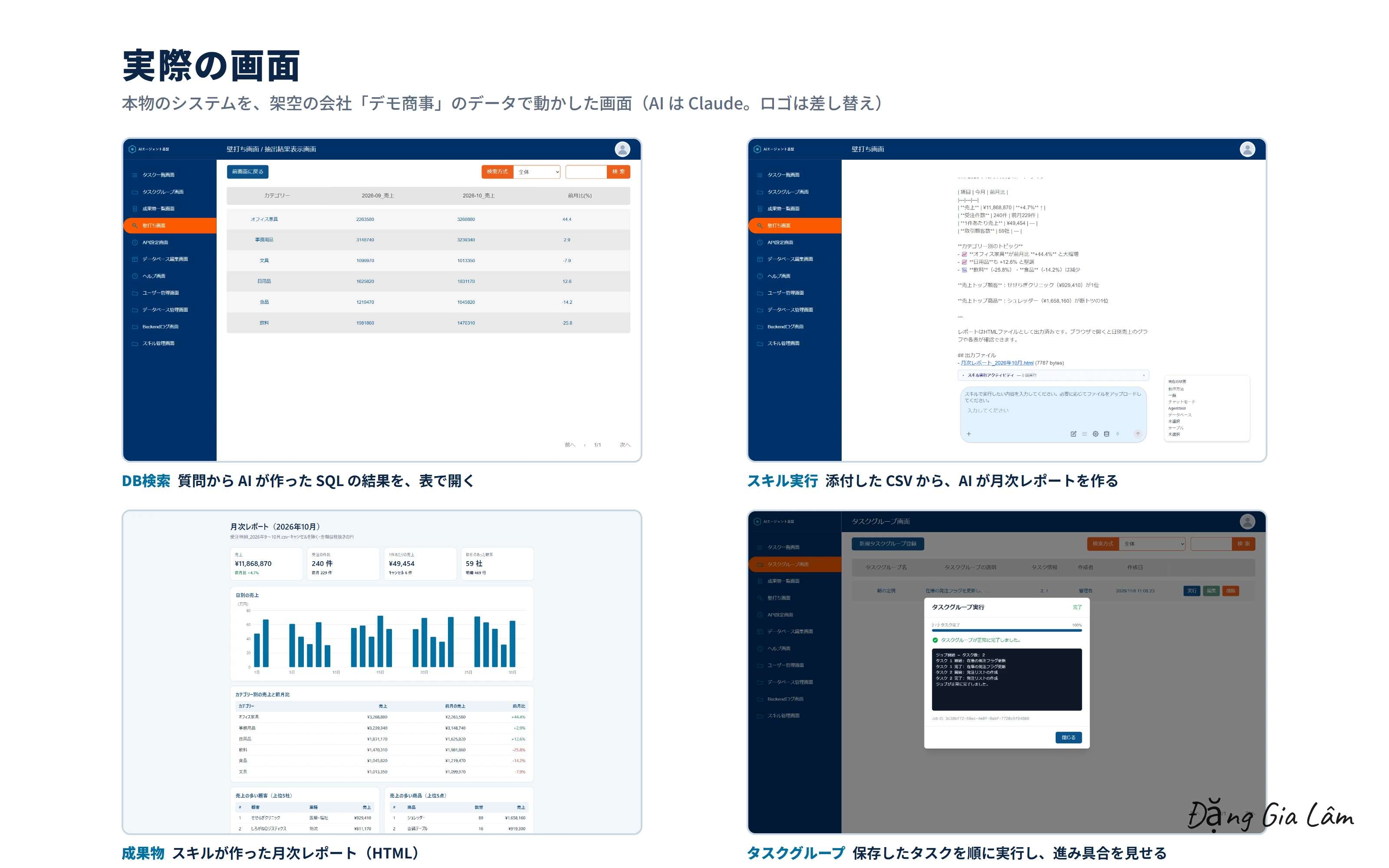
実際の画面Real screens
開発の歩みHow it was built
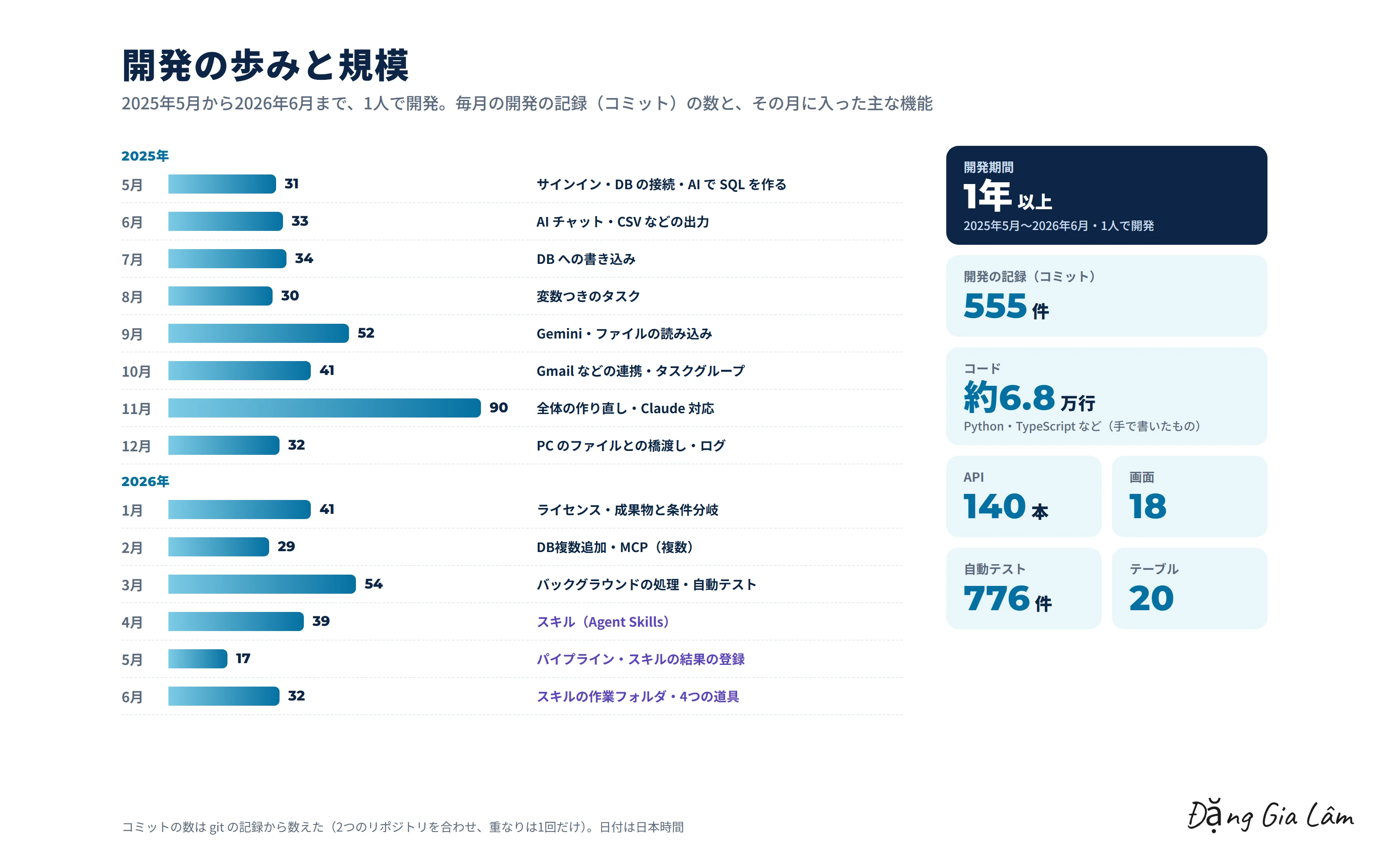
2025年5月にゼロから作り始め、毎月開発を続けました(コミット555件)。DB の検索と SQL の作成から始め、成果物・変数つきのタスク・Gemini・外部サービスとの連携・タスクグループを足し、11月に全体を作り直しました。2026年に入ってからは、ライセンス・バックグラウンドの処理・自動テスト・スキル(Agent Skills)・パイプラインを足しました。
I started from scratch in May 2025 and kept developing every month (555 commits). Beginning with DB search and SQL generation, I added artifacts, tasks with variables, Gemini, external service integrations and task groups, then rebuilt the whole system in November. In 2026 I added licensing, background processing, automated tests, skills (Agent Skills) and pipelines.
担当の範囲My role
画面・API・バックグラウンドの処理・AI の部分・自動テストを、1人で開発しました。
I built the UI, API, background processing, AI components and automated tests on my own.
WebデモWeb demo
架空の会社「デモ商事」のデータで、4つの流れ(検索と集計/更新と権限/スキル実行/タスクの連続実行)を動かした動画です。データベースはブラウザの中で動き、SQL はその場で実行しています。AI の文はデモ用に用意したものです。
A video of four flows (search and aggregation / updates and permissions / skill execution / running tasks in sequence) using data from a fictional company, "Demo Shoji". The database runs inside the browser and SQL is executed on the spot. The AI's replies were prepared for the demo.
このテーマで話しましょうLet's talk about this
同じテーマに取り組んでいる方と、情報交換できたらうれしいです。
I'd be glad to swap notes with anyone working on the same themes.
- 社内のデータベースを、AI に言葉で検索・集計させる仕組み
- 毎朝・毎月の定例の作業を、AI で自動にする方法
- AI に社内のファイルや外部サービスを、権限を決めて安全に扱わせる設計
- ChatGPT・Claude・Gemini を、切り替えて使える作り
- Letting AI search and aggregate company databases from plain language
- Automating daily and monthly routine work with AI
- Designing permissions so AI can safely handle company files and external services
- Building systems that can switch between ChatGPT, Claude and Gemini