AIが先生のように
一人ひとりを指導する、
AI学習チューター「MindMentor」
MindMentor, an AI learning tutor that guides each student like a teacher
約1か月About 1 month
生徒が教科とトピックを選んで AI チューターと話しながら学び、クイズの採点と進み具合から次に学ぶことがわかる Web アプリを開発し、納品しました。管理者は、教科ごとに教材と AI アシスタントを用意できます。
I developed and delivered a web app where students choose a subject and topic and learn by talking with an AI tutor, while quiz grading and progress tracking show them what to learn next. Administrators can set up learning materials and an AI assistant for each subject.
- 学び方Ways to learn
- 2つ
- AI チューターの学びの操作AI tutor learning actions
- 7つ
- 管理の画面Admin screens
- 4つ
つくったものWhat I built
お客様の依頼で、AI チューターと話しながら学ぶ学習アプリ「MindMentor」を作りました。納品して、使われました。
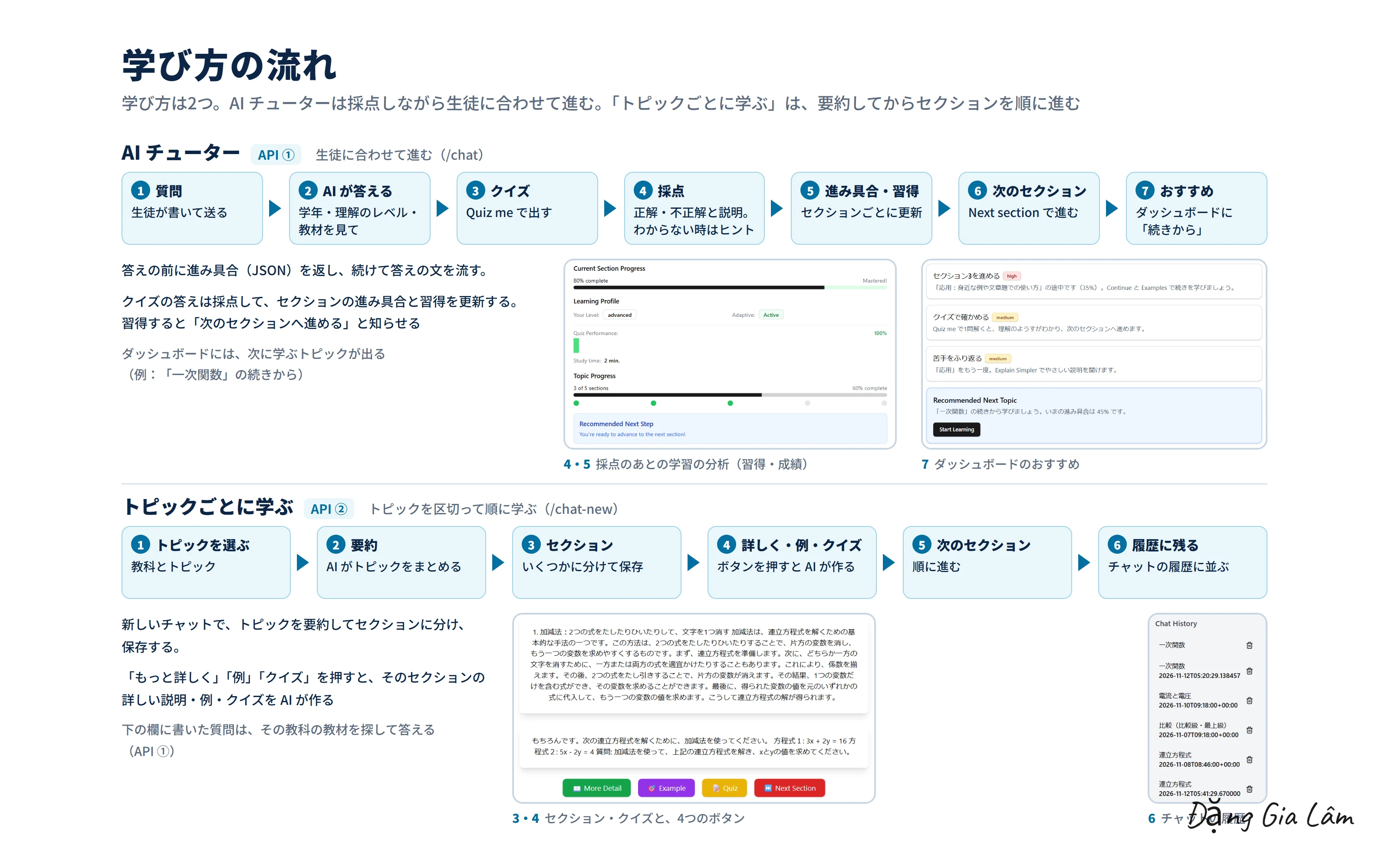
生徒ごとに理解の速さはちがっても、先生が1人ずつ付きっきりで教えるのは難しいものです。このアプリでは、生徒が教科とトピックを選んで AI チューターに質問し、例やクイズで確かめながら、自分の速さで進めます。AI はクイズの答えを採点し、セクションの進み具合と習得のようすを記録して、次に学ぶことを示します。
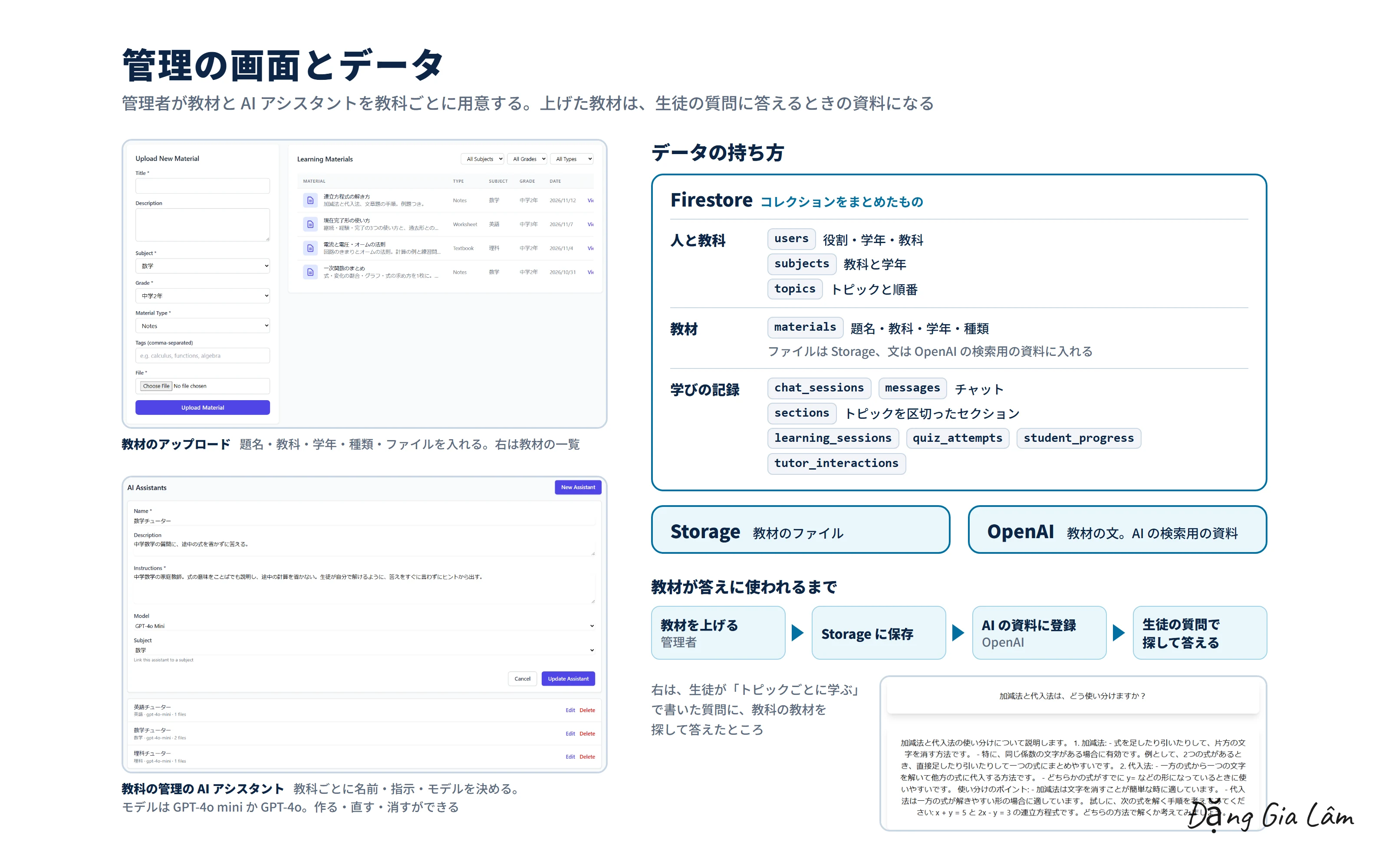
管理者は、教科・トピック・教材・ユーザーを画面から管理し、教科ごとに AI アシスタント(AI への指示とモデル)を決められます。上げた教材は、生徒の質問に AI が答えるときの資料になります。
At a client's request, I built MindMentor, a learning app where students learn by talking with an AI tutor. It was delivered and put to use.
Students understand at different speeds, but it is hard for a teacher to give each one individual attention. In this app, students choose a subject and topic, ask the AI tutor questions and check their understanding with examples and quizzes, moving at their own pace. The AI grades quiz answers, records section progress and mastery, and shows what to learn next.
Administrators manage subjects, topics, materials and users from the UI, and set an AI assistant (instructions and model) for each subject. Uploaded materials become the reference the AI draws on when it answers students' questions.
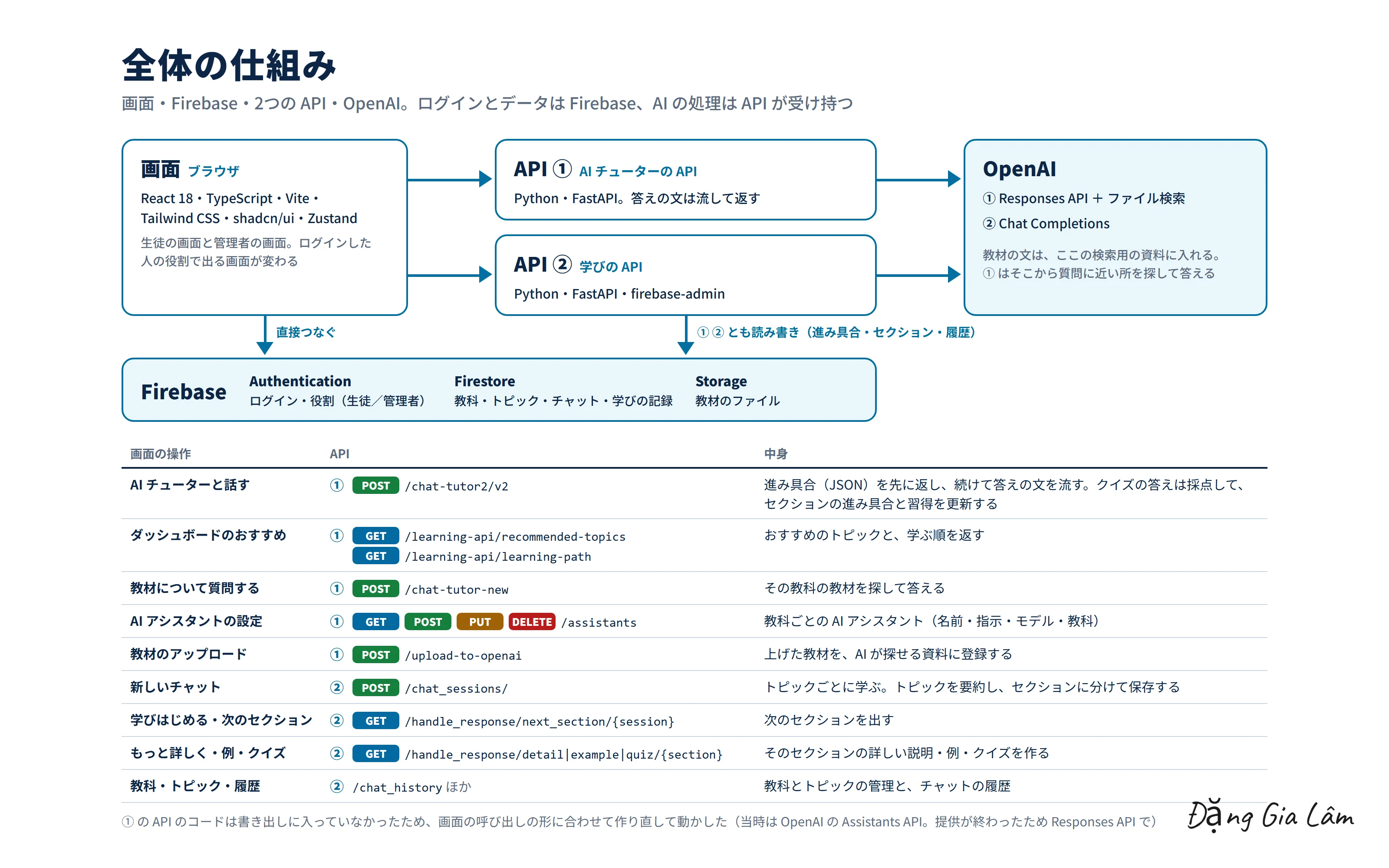
できることWhat it does
- 生徒の登録とログイン、パスワードの再設定。ログインした人の役割(生徒・管理者)で、出る画面が変わる
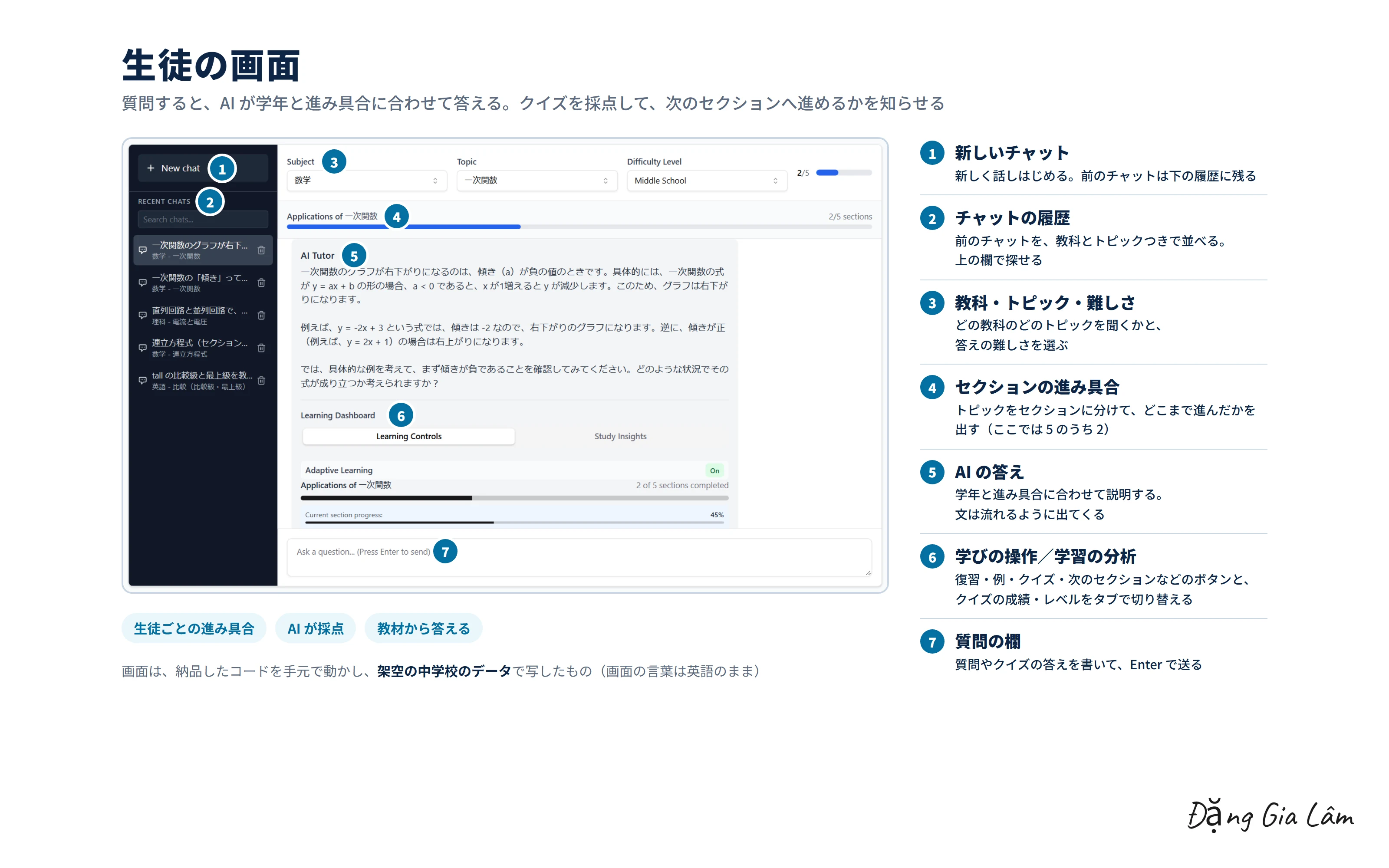
- ダッシュボード:学習の分析(続けた日数・理解のレベル・クイズの成績)と、おすすめ(「〇〇」の続きから)
- AI チューター:教科・トピック・難しさを選んで質問する。答えはその場で流れるように出る。チャットは履歴に残り、探せる
- 学びの操作:ふりかえり・例・クイズ・続ける・次のセクション・もっとやさしく・挑戦問題。クイズの答えは AI が採点し、わからないときはヒントを出す
- トピックごとに学ぶ:AI がトピックを要約してセクションに分け、セクションごとに「もっと詳しく」「例」「クイズ」「次のセクション」で進む
- 教材から答える:生徒の質問に、その教科の教材を探して答える
- 管理者:教材のアップロード(タイトル・教科・学年・種類・タグ)、教科ごとの AI アシスタント(名前・指示・モデル)、教科と学年の組み合わせ、トピック、ユーザー
- Student sign-up, login and password reset. The screens shown depend on the logged-in user's role (student or administrator)
- Dashboard: learning analytics (streak, understanding level, quiz results) and recommendations (“Continue with …”)
- AI tutor: choose a subject, topic and difficulty and ask questions. Answers stream in as they are written. Chats are kept in a searchable history
- Learning actions: recap, examples, quiz, continue, next section, explain simpler and challenge me. The AI grades quiz answers and gives hints when a student is stuck
- Learning by topic: the AI summarizes a topic and splits it into sections, and students move through each one with “More detail”, “Example”, “Quiz” and “Next section”
- Answers from materials: student questions are answered by searching that subject's materials
- Administrators: material uploads (title, subject, grade, type, tags), an AI assistant per subject (name, instructions, model), subject and grade combinations, topics and users
工夫した点What I focused on
- AI チューターの答えは、先に進み具合(セクション・習得・おすすめ)を返し、続けて答えの文を流す。生徒は待たずに読みはじめられ、画面の進み具合もすぐ変わる
- 生徒の学年・理解のレベル・クイズの成績に合わせて、AI の説明の仕方を変える
- 教科ごとに AI アシスタントと教材を持たせ、その教科の教材の範囲で答えさせる
- ログイン・データ・ファイルは Firebase をブラウザから直接使い、AI の処理だけを API に分けた
- トピックごとに学ぶでは、AI が作った要約とセクションを保存し、続きから学べるようにした
- The AI tutor's response returns progress (section, mastery, recommendations) first, then streams the answer text. Students can start reading without waiting, and the progress on screen updates right away
- The AI adjusts how it explains to each student's grade, understanding level and quiz results
- Each subject has its own AI assistant and materials, so answers stay within that subject's materials
- Login, data and files use Firebase directly from the browser, and only the AI processing is split out into APIs
- In learning by topic, the AI-generated summary and sections are saved so students can pick up where they left off
担当の範囲My role
画面、AI チューターの API、学びの API(Python・FastAPI)、Firebase のデータの設計まで、アプリ全体を開発しました。
I developed the whole app: the UI, the AI tutor API, the learning API (Python, FastAPI) and the Firebase data design.
WebデモWeb demo
架空の中学校の生徒と教材で Web デモを動かした動画です。AI の答えはデモ用に用意した文で(本物は OpenAI の API)、クイズの採点・進み具合・教材の検索は、ブラウザの中でその場で計算しています。管理者の画面で見本の教材を上げると、生徒の質問にその教材を引いて答えるようになります。
A video of the web demo running with students and materials from a fictional junior high school. The AI's answers are text prepared for the demo (the real app uses the OpenAI API), while quiz grading, progress and material search are calculated on the spot in the browser. Once a sample material is uploaded from the admin screen, the tutor cites it when answering students' questions.
実際のシステムの動きHow the real system was recorded
ページの最初の動画は、納品したコードを手元で動かし、架空の中学校のデータで撮りました。Firebase は手元のエミュレーターにつなぎ、AI の答えは OpenAI の API でその場で作っています。
AI チューターの API はコードが書き出しに入っていなかったため、画面の呼び出しの形に合わせて作り直しました(当時使った OpenAI の Assistants API は提供が終わったため、Responses API で)。動かすために画面のコードを少し直し、提供が終わった AI のモデルを今のモデルに替えています。AI の返事を待つ間のうち、くるくるの表示だけの所は3倍の速さにしています。
The first video on this page was recorded by running the delivered code locally with data from a fictional junior high school. Firebase is connected to local emulators, and the AI's answers are generated live with the OpenAI API.
The AI tutor API's code was not included in the export, so I rebuilt it to match how the UI calls it (using the Responses API, since the Assistants API used at the time has been retired). To get it running, I made small fixes to the UI code and replaced retired AI models with current ones. Stretches of waiting for AI replies where only a spinner is shown play at 3× speed.
このテーマで話しましょうLet's talk about this
同じテーマに取り組んでいる方と、情報交換できたらうれしいです。
I'd be glad to swap notes with anyone working on the same themes.
- 塾や学習サービスで、生徒ごとの進み具合を見ながら AI が教える仕組み
- 自社の教材を AI に読ませて、その範囲で生徒の質問に答えさせる方法
- クイズを AI で採点して、次に学ぶことを生徒に示す設計
- 教科ごとに AI への指示やモデルを変え、管理の画面から設定する作り
- AI teaching that follows each student's progress, for cram schools and learning services
- Having AI read your own materials and answer students' questions within that scope
- Grading quizzes with AI and showing students what to learn next
- Changing AI instructions and models per subject, set from an admin screen