面談の録音からスキルシートを作る、
人材派遣向け 面談AIシステム
An interview AI system for staffing agencies that turns recordings into skill sheets
2024.10 – 2025.04
派遣会社の担当者が候補者との面談の録音を上げると、AI が文字起こしをして、スキルシート・推薦文・希望条件を作り、担当者が確かめてから PDF と Salesforce に入れる Web システムを、3名のチームで約7か月かけて開発しました。
Over about seven months, a team of three built a web system where staffing agency staff upload recordings of their interviews with candidates. The AI transcribes them and drafts skill sheets, recommendations and desired conditions, and staff review the results before they go into PDFs and Salesforce.
- AI のワークフローAI workflows
- 3つ
- 文字起こしの並列(最大)Parallel transcription (max)
- 10並列
- Salesforce に書ける経歴Career entries to Salesforce
- 15件
つくったものWhat I built
人材派遣・人材紹介の会社の営業担当やコーディネーターが使う、面談の記録づくりを AI で進める Web システムを開発しました。お客様の会社の、実際の運用の環境で使われました。
面談の内容は、それまで担当者が手で整理してスキルシートにしていて、時間がかかり、人によって書き方もばらついていました。このシステムでは、録音を上げるだけで、文字起こし → スキルシート・推薦文・希望条件 → 担当者が確かめて直す → PDF・Salesforce までを、1つの流れで進められます。
I developed a web system that uses AI to help sales staff and coordinators at staffing and recruitment agencies write up their interviews. It was used in the client company's production environment.
Until then, staff organized interview notes by hand into skill sheets, which took time and varied from person to person. With this system, uploading a recording is all it takes: transcription → skill sheet, recommendation and desired conditions → staff review and edit → PDF and Salesforce, all in one flow.
できることWhat it does
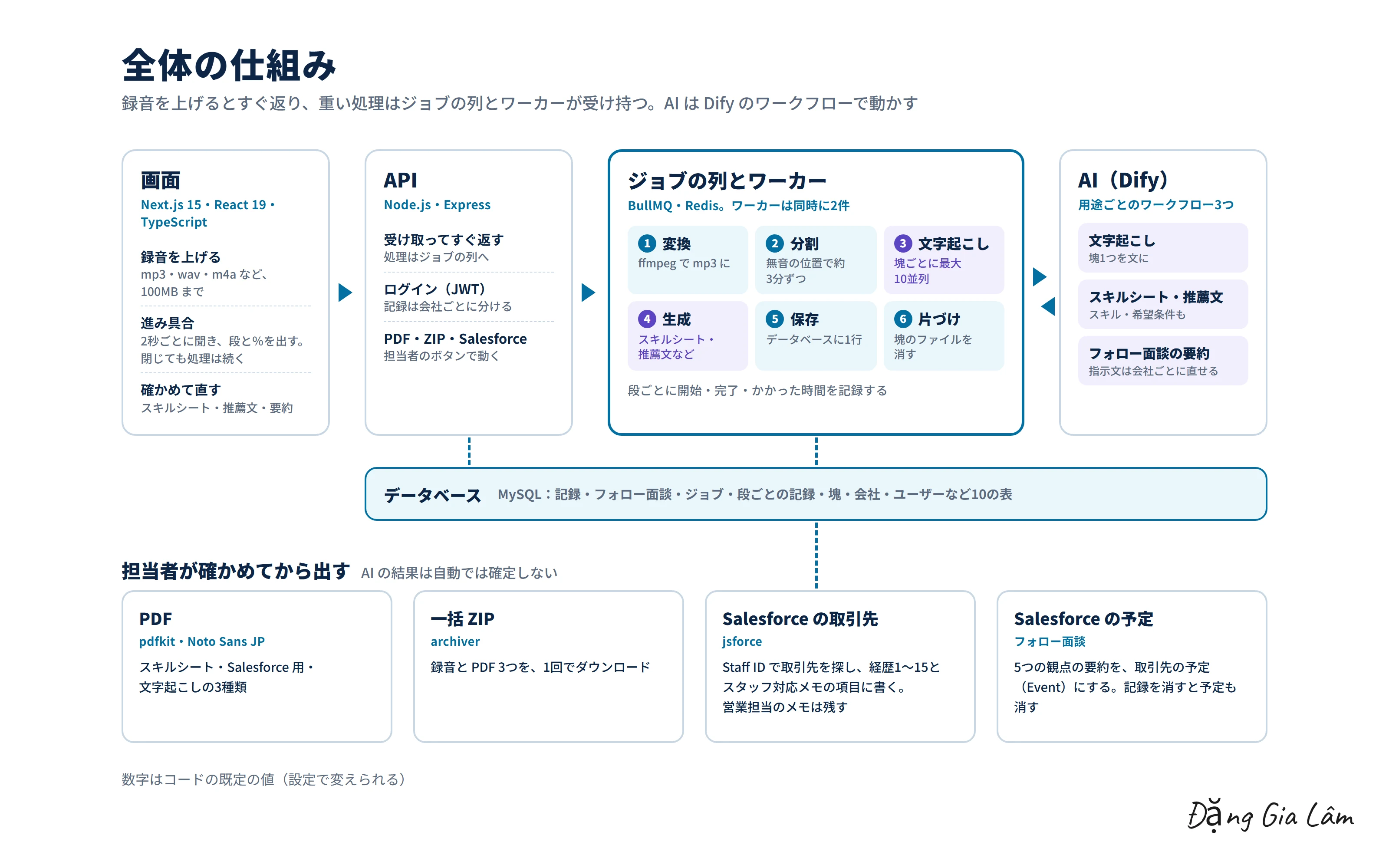
- 録音(mp3・wav・m4a など、100MB まで)を上げると、処理はジョブの列に入り、別に動くワーカーが進める。画面には進み具合(%と段の名前)が出て、画面を閉じても処理は続く
- 録音を無音の位置で分け、塊ごとに最大10並列で文字起こしをする(Dify)
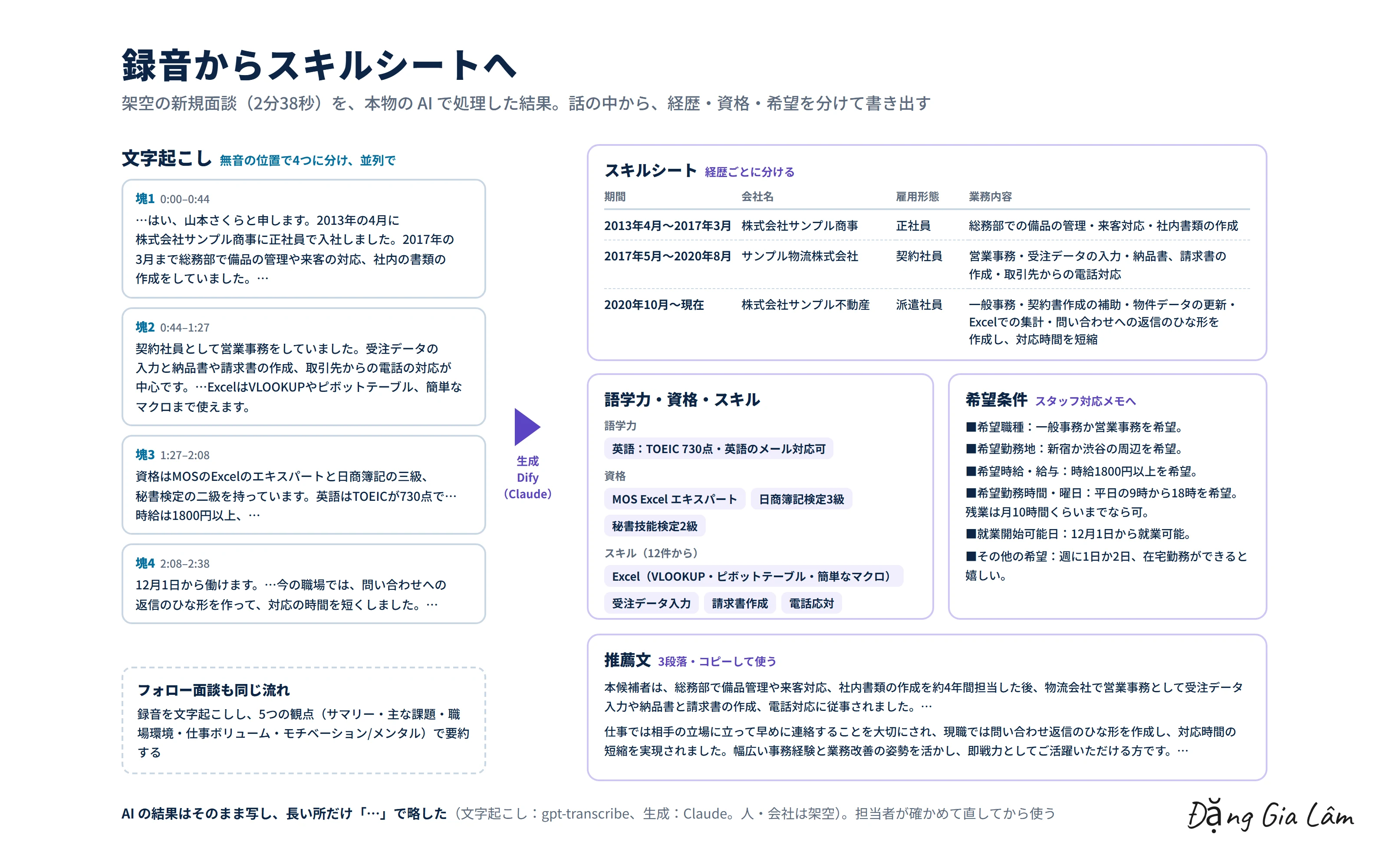
- Dify の AI のワークフローで、スキルシート(経歴ごとの期間・会社名・雇用形態・業務内容)・推薦文・スキル(語学力・資格・スキル)・希望条件を作る
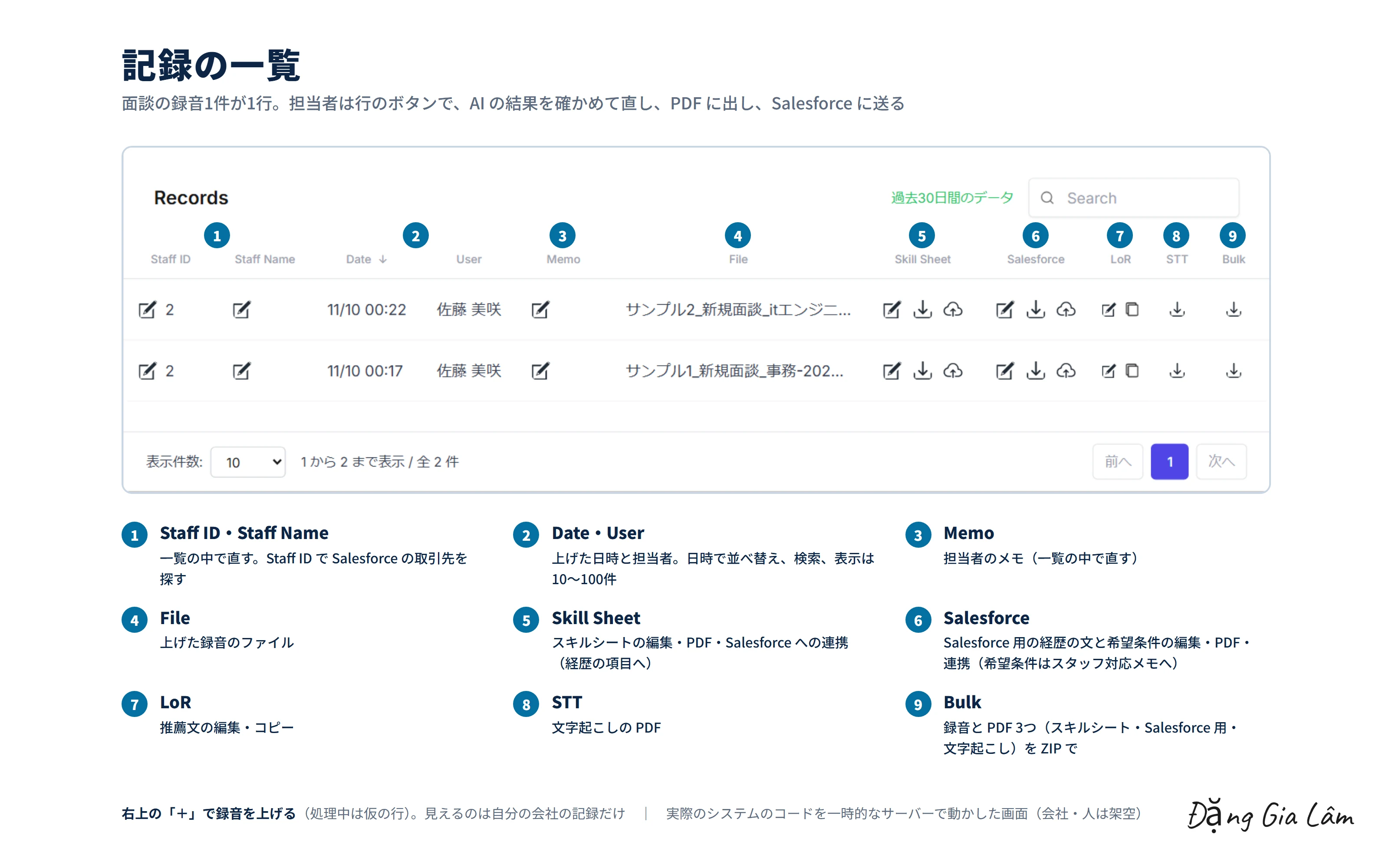
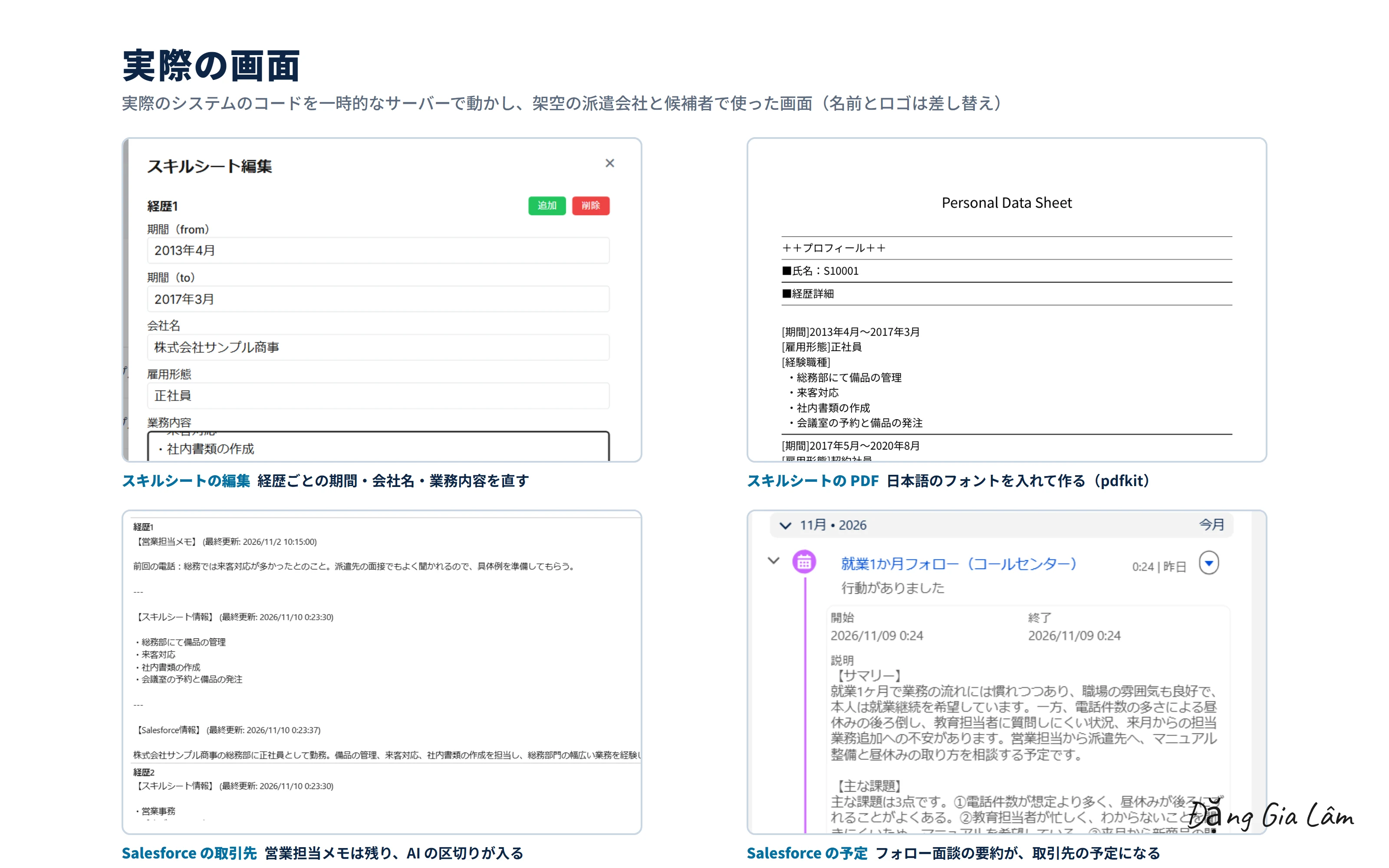
- 記録の一覧で、スキルシートと Salesforce 用の情報の編集と PDF、推薦文の編集とコピー、文字起こしの PDF、録音と PDF 3つの一括 ZIP
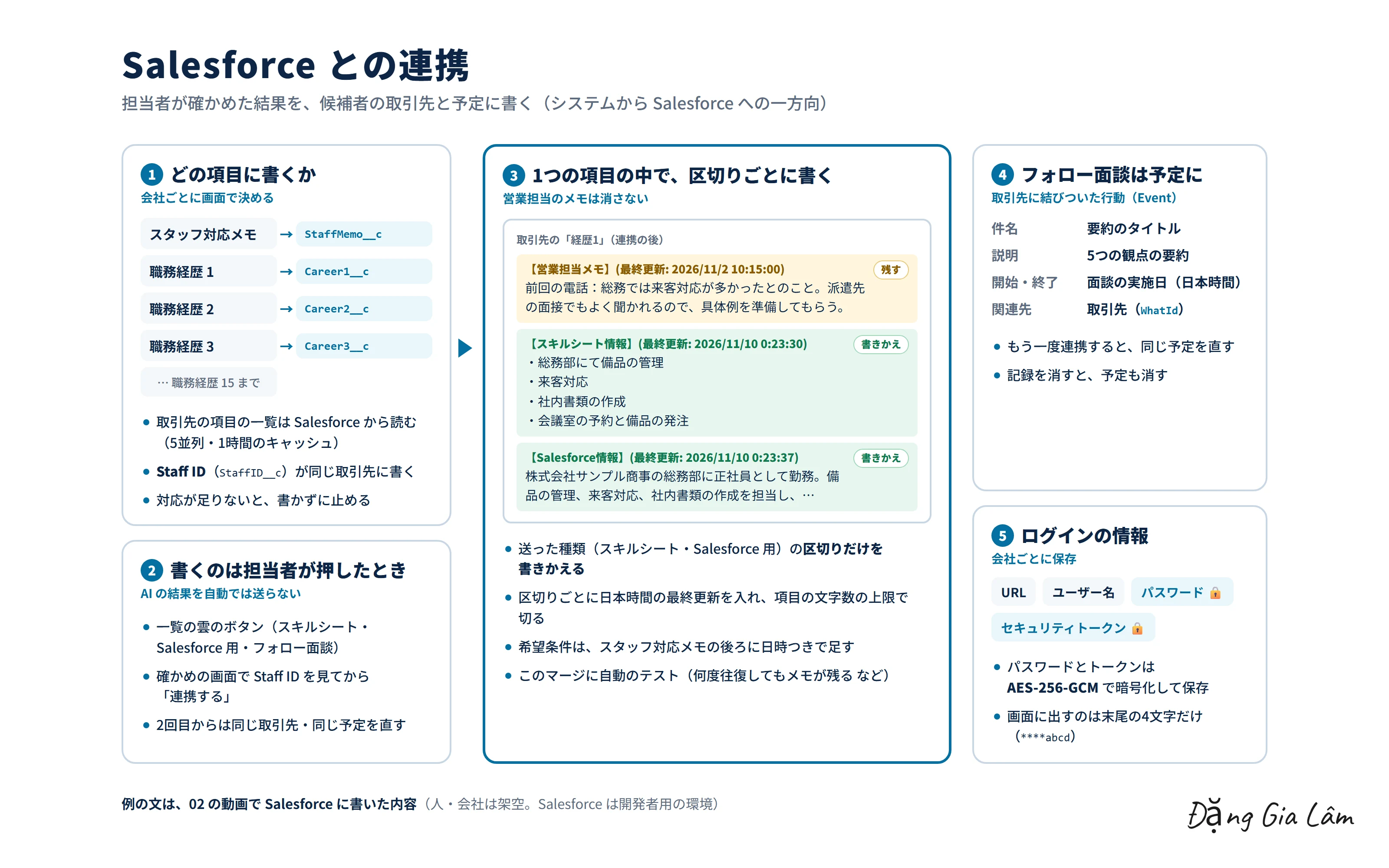
- Salesforce の候補者の取引先に、経歴1〜15とスタッフ対応メモを書く。どの項目に書くかは画面で選ぶ
- 契約のあとのフォロー面談は、5つの観点(サマリー・主な課題・職場環境・仕事ボリューム・モチベーション/メンタル)で要約し、Salesforce の予定にする。要約の指示文は会社ごとに画面で直せる
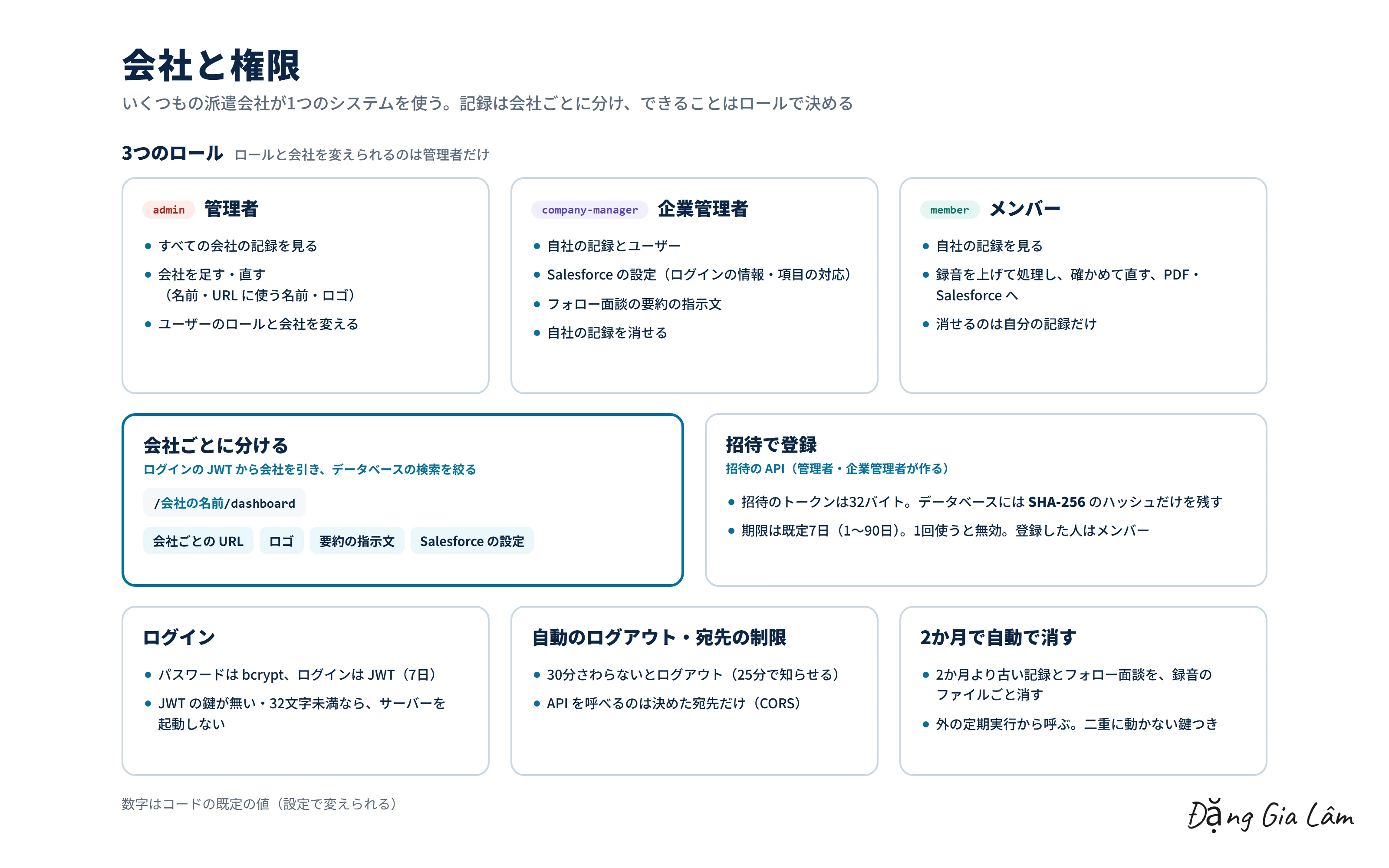
- いくつもの派遣会社が1つのシステムを使う作り。会社ごとの URL・ロゴ・要約の指示文・Salesforce の設定。管理者・企業管理者・メンバーの3つのロール
- When a recording (mp3, wav, m4a and more, up to 100 MB) is uploaded, the work goes into a job queue and a separate worker processes it. The screen shows progress (percentage and stage name), and processing continues even if the screen is closed
- Recordings are split at silent points, and the chunks are transcribed up to 10 at a time in parallel (Dify)
- AI workflows in Dify produce the skill sheet (period, company, employment type and duties for each job), a recommendation, skills (languages, certifications, skills) and desired conditions
- From the record list, staff can edit skill sheets and Salesforce data and export PDFs, edit and copy recommendations, export the transcript as a PDF, and download the recording and three PDFs together as a ZIP
- Writes career entries 1–15 and staff notes to the candidate's account in Salesforce. Which fields to write to is chosen in the UI
- Follow-up interviews after placement are summarized from five angles (summary, main issues, workplace, workload, motivation/mental state) and saved as a Salesforce event. The summary prompt can be edited per company in the UI
- Many staffing agencies share one system, each with its own URL, logo, summary prompt and Salesforce settings. Three roles: administrator, company manager and member
工夫した点What I focused on
- AI の結果はそのまま確定させず、担当者が確かめて直してから、ボタンを押したときだけ Salesforce に送る
- Salesforce の1つの項目の中を【営業担当メモ】【スキルシート情報】【Salesforce情報】に分け、送った区切りだけを書きかえる。営業担当が書いたメモは消さない。このまとめ方には自動テストを付けた
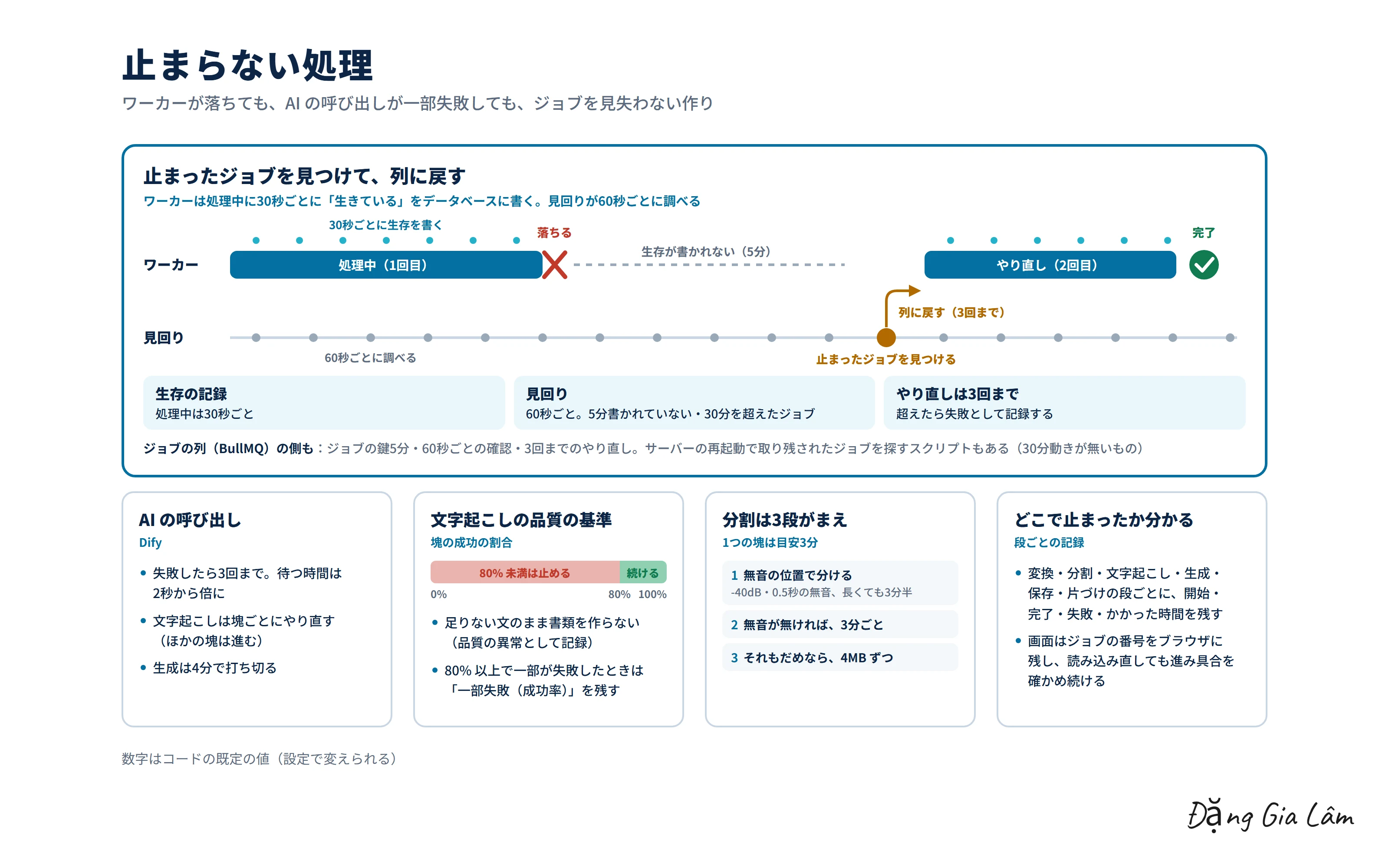
- ワーカーは処理中に30秒ごとに「生きている」を記録し、見回りが60秒ごとに止まったジョブを見つけて列に戻す(3回まで)。段ごとに開始・完了・失敗・かかった時間を残す
- 文字起こしの成功が80%未満なら、足りない文のまま書類を作らずに止める。AI の呼び出しは3回までやり直す
- 録音の分け方は、無音の位置 → 3分ごと → 4MB ずつ、の3段がまえ
- Salesforce のパスワードとトークンは AES-256-GCM で暗号化して保存し、画面には末尾だけを出す
- 招待で登録する API(トークンは SHA-256 のハッシュだけを保存、期限つき・1回だけ)、30分さわらないと自動でログアウト、2か月より古い記録は録音のファイルごと自動で消す
- AI results are never final as-is. Staff review and edit them, and data is sent to Salesforce only when they press the button
- A single Salesforce field is divided into [Sales notes], [Skill sheet info] and [Salesforce info] sections, and only the section being sent is rewritten, so notes written by sales staff are never erased. This merge logic has automated tests
- While processing, workers record a heartbeat every 30 seconds, and a watchdog checks every 60 seconds for stalled jobs and puts them back in the queue (up to 3 times). Start, completion, failure and duration are logged for each stage
- If less than 80% of the transcription succeeds, processing stops rather than producing documents from incomplete text. AI calls are retried up to 3 times
- Recordings are split with three fallbacks: at silent points → every 3 minutes → every 4 MB
- Salesforce passwords and tokens are stored encrypted with AES-256-GCM, and only the last characters are shown on screen
- An invite-based sign-up API (only the SHA-256 hash of the token is stored; tokens expire and work once), automatic logout after 30 minutes of inactivity, and automatic deletion of records older than two months, recordings included
実際の画面Real screens
担当の範囲My role
デザイナー・テスター・私の3名のチームで開発しました。要件はお客様が決め、私は見た目のデザインと検証を除く、設計と実装(画面の構造の設計・画面・API・データベース・Dify と Salesforce の連携・非同期の処理の基盤)を担当しました。
We built it as a team of three: a designer, a tester and me. The client set the requirements, and I handled design and implementation apart from the visual design and testing: UI structure design, the UI, API and database, the Dify and Salesforce integrations, and the asynchronous processing infrastructure.
WebデモWeb demo
架空の派遣会社と、架空の面談の録音で Web デモを動かした動画です。文字起こしと生成は本物の AI(Dify。文字起こしは OpenAI の gpt-transcribe、生成は Claude Opus 5.5)で、Salesforce への書き込みも本物です(開発者用の環境の、架空の取引先だけ)。最後に、管理者・企業管理者・メンバーでログインし直し、見える記録とメニューの違いも確かめています。
A video of the web demo running with a fictional staffing agency and fictional interview recordings. Transcription and generation use real AI (Dify, with OpenAI's gpt-transcribe for transcription and Claude Opus 5.5 for generation), and the writes to Salesforce are real too (only fictional accounts in a developer environment). At the end, it logs in again as an administrator, a company manager and a member to show how the visible records and menus differ.
このテーマで話しましょうLet's talk about this
同じテーマに取り組んでいる方と、情報交換できたらうれしいです。
I'd be glad to swap notes with anyone working on the same themes.
- 面談・商談・ヒアリングの録音から、AI で決まった形の書類を作る仕組み
- AI が作った内容を、人が確かめてから Salesforce などの社内のシステムに入れる設計
- 長い録音の文字起こしを、並列で速く、途中で止まっても続くように回す方法
- Dify で作った AI のワークフローを、業務システムに組み込むやり方
- Turning recordings of interviews, sales meetings and hearings into fixed-format documents with AI
- Designing flows where people review AI output before it goes into Salesforce or other internal systems
- Transcribing long recordings in parallel, quickly, and in a way that resumes after failures
- Embedding AI workflows built in Dify into business systems